Turn your X (Twitter) bookmarks into Obsidian notes
Export X bookmarks, likes or posts as one Markdown note per post, with properties for author, date, numbers and folder, plus an index note. What the notes look like and how to keep them up to date.
Bookmarks on X are easy to save and hard to find again. In Obsidian they can sit next to your own notes, link to them, and show up in search and queries. This guide turns them into one Markdown note per post with Creel, a Chrome extension I make.
Obsidian notes are part of Creel Pro (a one-time $19.99). If you are on the free plan, the last section shows the free route.
What you get
A ZIP file with:
- One note per post, named
date author id.md, for example2026-09-14 ava_stone 1843210987654321098.md. - Properties at the top of each note: link, author, date, kind (post, reply, quote, repost), likes, reposts, replies, views, bookmarks, language, the bookmark folder, where it was collected from, and tags from the post's hashtags.
- The post itself: author, full text, images, a link to any video, the quoted post as a quote block, and a link back to X.
- An
Index.mdthat lists every note by date and author, with a short preview.
Here is a real note as Creel writes it (from a demo account):
---
source: "X"
url: "https://x.com/ava_stone/status/1843210987654321098"
id: "1843210987654321098"
author: "ava_stone"
author_name: "Ava Stone"
created: 2026-09-14T08:21:05
kind: "post"
likes: 412
reposts: 38
replies: 21
views: 18400
bookmarks: 96
lang: "en"
folder: "Writing"
collected_from: "bookmarks"
tags:
- "x-post"
- "notes"
---
**Ava Stone** [@ava_stone](https://x.com/ava_stone)
Three things I check before I save a thread for later:
1\. Will I search for it again?
2\. Does it have a source?
3\. Would I quote it? #notes

[Open on X](https://x.com/ava_stone/status/1843210987654321098)
Step by step
- Export your bookmarks with Creel: open x.com/i/bookmarks, click the Creel icon, choose all bookmarks or one folder, and start. The bookmarks guide walks through this part.
- Open the Download Manager from the Creel popup and select the finished export.
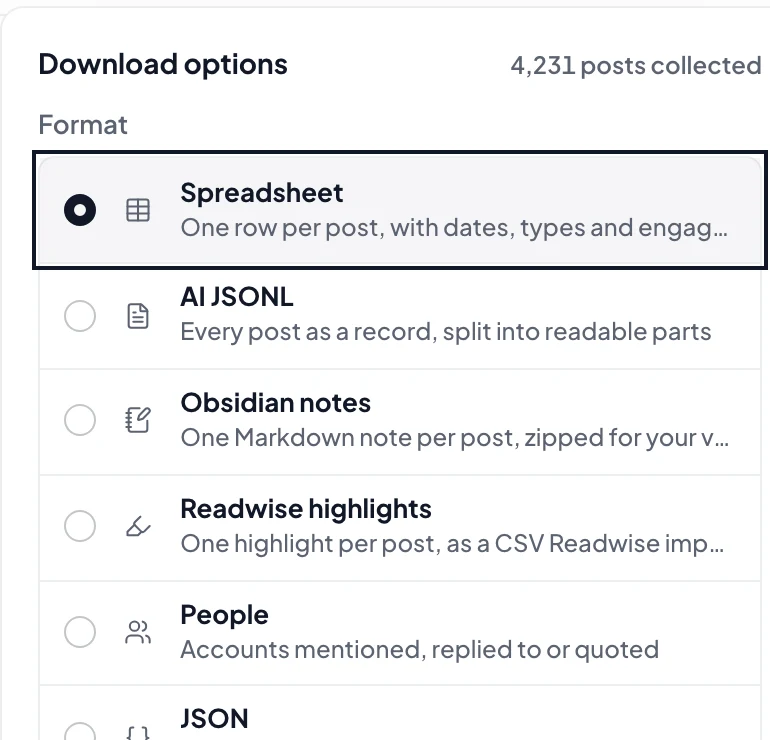
- Pick "Obsidian notes" in the format menu and download. You get one ZIP.
- Unzip it into your vault, for example into a folder called
X/Bookmarks. Obsidian picks the notes up at once.
The same works for your likes and for the posts of any profile you export: choose Obsidian notes for that export instead.
Using the properties
Because every note has the same properties, you can sort and filter them like a table. With Obsidian's Bases, make a base on the folder and show author, created, likes and folder as columns. With the community plugin Dataview, a query like this lists your most liked bookmarks in one folder:
TABLE author, created, likes
FROM "X/Bookmarks"
WHERE folder = "Writing"
SORT likes DESC
Tags from hashtags work with Obsidian's tag pane, and every note carries x-post, so you can tell saved posts apart from your own notes.
Keeping it up to date
Note names come from the post's date, author and ID, so a post gets the same file name in every export. Creel does not sync your vault: each export is a new ZIP, whose outer folder carries the export date. To update, copy the notes from inside the new ZIP into the same vault folder and let your system replace files with the same name. Posts you already have are replaced rather than duplicated, new posts are added, and a post whose author changed their username gets a new file.
Two things follow from that:
- Write your own thoughts in separate notes that link to the saved post, for example
[[2026-09-14 ava_stone 1843210987654321098]]. A later export would replace changes made inside the saved note. - Removing a bookmark on X does not delete its note; the old file stays until you delete it.
Limits worth knowing
- Images are links, shown from X's servers. They display while you are online. To keep the files themselves, download photos and videos with Creel (also Pro) and keep them next to the notes.
- One ZIP holds up to 60,000 notes. Larger exports need to be split by folder.
- The free plan does not include Obsidian notes.
The free route
On the free plan, export the same bookmarks as JSON or CSV (up to 1,000 per export) and turn them into notes with a script or an import plugin you already use. You keep the data either way; Pro saves you the conversion and adds the properties, the index and stable names.
Creel runs in your browser with the X session you are already signed in to. Nothing you collect is sent to a server. Plans and the Free limits are on the Creel page, and Creel is on the Chrome Web Store.